Chapter 3 · Variables, types, functions, and control flow.
Before sending a conversation to a model, estimate its size and decide whether to split it into smaller pieces. Use variables to store the counts, functions to calculate costs, and conditions to choose a model.
The examples use rough token estimates and sample prices and context limits. Use your model's tokenizer and provider's pricing for actual usage.
Run the examples
Install Canary using Get started, then create a project:
Put the examples in baml_src/main.baml. Each section gives you a separate example; replace the previous code unless the section says to keep it. Most examples define main, which you can check and run with:
check finds errors without running the program. run executes a function and prints its return value. You won't need an API key for the commands in this chapter.
Variables and mutability
A variable gives a value a name. Use let to create a variable, and = to give it its initial value:
 main.baml
function main() -> int {
let remaining = 8_000;
log.info(remaining);
remaining = remaining - 512;
remaining = remaining - 3_100;
log.info(remaining);
remaining
}function main() -> int {
let remaining = 8_000;
log.info(remaining);
remaining = remaining - 512;
remaining = remaining - 3_100;
log.info(remaining);
remaining
}main is a function: a named piece of code you can run. Its body is the code between { and }. The -> int says that it returns an integer. Here, the final expression, remaining, supplies that value.
Read the body from top to bottom:
let remaining = 8_000;starts with a budget of 8,000 tokens. Underscores make large numbers easier to read; they don't change the value.remaining = remaining - 512;subtracts 512 and stores the result under the same name.- The next assignment subtracts another 3,100. The function returns
4388.
Changing an existing variable's value is called reassignment. BAML's let allows reassignment without an extra keyword.
Inspect a value
The two log.info calls record remaining before and after the subtractions. Enable those logs when you run the function:
The last line is the return value. Without --log info, this command prints only that value.
Keep the same type when reassigning
A type describes what kind of value a variable can hold. BAML infers int for remaining from its initial value. Reassignment can change the number, but it can't replace it with text:
main.bamlfunction main() -> int {
let remaining = 8_000;
remaining = "spent";
remaining
}function main() -> int {
let remaining = 8_000;
remaining = "spent";
remaining
}This example intentionally fails baml check: remaining requires an int, and "spent" is a string. Keep the budget as a number; use a separate value when you need a message.
A let declaration also needs an initial value. let remaining; doesn't compile.
Reuse a name for a new value
A second let creates a new variable. It can reuse a name and have a different type:
main.bamlfunction main() -> int {
let transcript = " What is your refund policy? ";
let transcript = transcript.trim();
let transcript = transcript.length();
transcript
}function main() -> int {
let transcript = " What is your refund policy? ";
let transcript = transcript.trim();
let transcript = transcript.length();
transcript
}Each line uses the previous value of transcript to calculate the next one. trim() removes surrounding whitespace; length() counts the characters. The final transcript is an int, and main returns 27.
This is called shadowing. Unlike reassignment, it creates a new binding between a name and a value. Names declared inside a block are available within that block; they don't become available outside it.
Data types
Start with these four types:
| Type | Holds | Example |
|---|---|---|
int | Whole numbers | 8_000 |
float | Numbers with a fractional part | 2.85 |
string | Text | "Order status?" |
bool | A true or false value | true |
BAML can infer a variable's type, or you can write a type annotation after its name: let remaining: int = 8_000;. An annotation asks the compiler to check that the value has that type.
Integer division drops the fractional part
Suppose a call uses 950,000 input tokens at an invented price of 300 cents per million tokens:
main.bamlfunction main() -> string {
let tokens = 950_000;
let price_cents_per_mtok = 300;
let cents = tokens * price_cents_per_mtok / 1_000_000;
let dollars = cents / 100;
`this call will cost about $${dollars}`
}function main() -> string {
let tokens = 950_000;
let price_cents_per_mtok = 300;
let cents = tokens * price_cents_per_mtok / 1_000_000;
let dollars = cents / 100;
`this call will cost about $${dollars}`
}The calculation produces 285 cents, but the function returns "this call will cost about $2". It compiles successfully and still gives the wrong display value.
Both operands in cents / 100 are integers. Integer division discards the fractional part, so 285 / 100 is 2. The remainder operator, %, gives the part left over: 285 % 100 is 85.
Use a float operand for fractional division
Change the divisor to 100.0:
main.bamlfunction main() -> string {
let tokens = 950_000;
let price_cents_per_mtok = 300;
let cents = tokens * price_cents_per_mtok / 1_000_000;
let dollars = cents / 100.0;
`this call will cost about $${dollars}`
}function main() -> string {
let tokens = 950_000;
let price_cents_per_mtok = 300;
let cents = tokens * price_cents_per_mtok / 1_000_000;
let dollars = cents / 100.0;
`this call will cost about $${dollars}`
}Now dollars is a float, and the function returns "this call will cost about $2.85". Arithmetic with a float operand produces a float result.
A type annotation doesn't perform this conversion for you:
main.bamlfunction main() -> float {
let cents = 285;
let dollars: float = cents / 100;
dollars
}function main() -> float {
let cents = 285;
let dollars: float = cents / 100;
dollars
}The compiler rejects the int result of cents / 100 where you requested float. Change the calculation to cents / 100.0 to fix it.
Floats approximate many decimal values: 0.1 + 0.2 produces 0.30000000000000004. Keep money in integer units when you need exact accounting. The examples here demonstrate arithmetic, not a billing implementation.
Compare values
Comparisons such as remaining > 0 and remaining <= 8_000 produce a bool. Use == to test equality and != to test inequality. Combine boolean conditions with && (both are true), || (at least one is true), and ! (negation).
Use matching numeric types when comparing numbers. Mixed arithmetic works, but ordering an int against a float, such as 2 < 2.5, doesn't compile. Equality doesn't convert them either: 2 == 2.0 is false.
An int holds whole numbers from −2⁶² to 2⁶²−1. Arithmetic overflow and division by zero cause runtime panics. Handle errors explains how panics differ from ordinary errors.
Strings
Use double quotes for literal text and backticks when you want to insert values. The ${expression} inside a backtick string is called interpolation:
main.bamlfunction describe_cost(cents: int) -> string {
`cost in cents: ${cents}`
}function describe_cost(cents: int) -> string {
`cost in cents: ${cents}`
}describe_cost(285) returns "cost in cents: 285". The double-quoted "cost in cents: ${cents}" would keep ${cents} as literal text.
Use \n for a line break. Backtick strings can also span several source lines, which is useful when writing prompts.
A backslash starts an escape sequence: \\ is a backslash, \" is a double quote, and \u{1F600} is a Unicode character. An unknown escape such as \d doesn't compile. For text with many backslashes, like a regular expression, use a raw string: r"\d+" keeps every backslash as written.
+ joins two strings, but it doesn't convert a number to text. Use interpolation when the value you want to insert is a number or another type.
Functions
A function lets you name a calculation and use it with different inputs. Here is a rough token estimator:
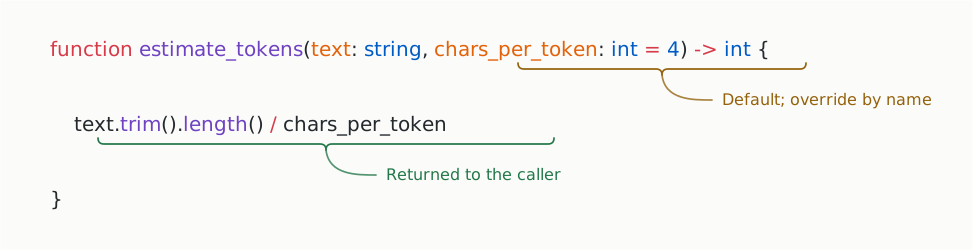
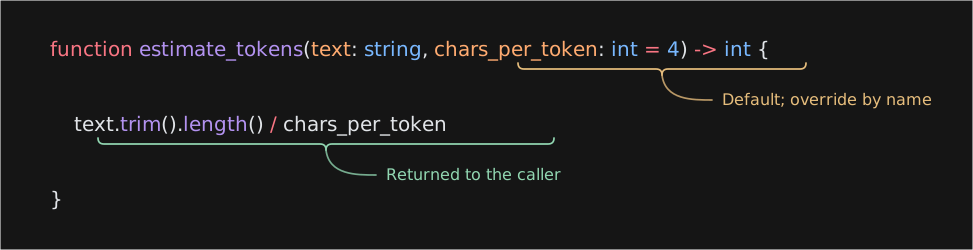
textandchars_per_tokenare parameters: names for the inputs inside the function.- Each parameter declares its type after
:. -> intdeclares the return type. Every function declares one.chars_per_token: int = 4supplies a default value when the caller leaves that input out.
The expression text.trim().length() / chars_per_token supplies the return value. It uses integer division, so this estimator rounds down. It isn't a model tokenizer.
Keep estimate_tokens and add a caller:
main.bamlfunction main() -> string {
let transcript = "user: Where is my order?\nagent: It shipped on Tuesday.";
let prose = estimate_tokens(transcript);
let dense = estimate_tokens(transcript, chars_per_token = 3);
`between ${prose} and ${dense} tokens`
}function main() -> string {
let transcript = "user: Where is my order?\nagent: It shipped on Tuesday.";
let prose = estimate_tokens(transcript);
let dense = estimate_tokens(transcript, chars_per_token = 3);
`between ${prose} and ${dense} tokens`
}An argument is a value supplied in a call. The first call passes only transcript. The second also passes chars_per_token = 3. Running main returns "between 13 and 18 tokens".
Override defaults by name
To override a defaulted parameter, write its name. estimate_tokens(transcript, 3) doesn't compile; use estimate_tokens(transcript, chars_per_token = 3).
You can name required arguments too. This call names both arguments and puts them in a different order:
It returns 3. The -e option evaluates an expression using the functions in your project.
Use snake_case for function and variable names: lowercase words separated by underscores.
Return values
A function can return its final expression, as estimate_tokens does, or use return to exit earlier:
main.bamlfunction clamp_tokens(tokens: int, window: int) -> int {
if (tokens > window) {
return window;
}
tokens
}function clamp_tokens(tokens: int, window: int) -> int {
if (tokens > window) {
return window;
}
tokens
}clamp_tokens(9_000, 8_000) returns 8000 from inside the if. clamp_tokens(500, 8_000) reaches the final expression and returns 500. Both results must match -> int.
A function that performs work without returning a value declares -> void. A bare return; exits that function:
main.bamlfunction report_budget(tokens: int, window: int) -> void {
if (tokens <= window) {
return;
}
log.info(`over budget by ${tokens - window} tokens`);
}function report_budget(tokens: int, window: int) -> void {
if (tokens <= window) {
return;
}
log.info(`over budget by ${tokens - window} tokens`);
}report_budget logs only when tokens exceeds window. The next sections explain if in more detail.
AI functions
An AI function has typed parameters and a return type too. Its body specifies a client and a prompt:
main.bamlclient Fast = openai.ResponsesClient.new(
model = "gpt-4o-mini",
api_key = env.OPENAI_API_KEY
);
function summarize(transcript: string) -> string {
client: Fast
prompt: `
${role("system")}
Summarize this conversation in one sentence.
${role("user")}
${transcript}
`
}client Fast = openai.ResponsesClient.new(
model = "gpt-4o-mini",
api_key = env.OPENAI_API_KEY
);
function summarize(transcript: string) -> string {
client: Fast
prompt: `
${role("system")}
Summarize this conversation in one sentence.
${role("user")}
${transcript}
`
}Fast configures an OpenAI client. role("system") starts the message containing the instructions; role("user") starts the message containing the transcript. Everything after a role marker belongs to that message until the next marker.
Calling summarize(transcript) asks the model for a string. That call requires provider credentials and network access. You can check this declaration with baml check without making a model request.
Parse a sample response without a model
BAML also generates operations for the function. @parse converts supplied response text to its declared return type:
This returns "The order shipped Tuesday." without calling the provider. To inspect the prompt with a transcript inserted, run:
These operations let you inspect the prompt and test response parsing separately from making a live call. Images and vision models shows model calls and structured return values in a complete example.
Comments
Comments explain decisions to the next person reading your code. // starts a comment that ends at the end of the line. /* ... */ marks a block comment; block comments don't nest.
Use /// above a declaration to document it. Inside a function, //# names a step:
main.baml/// Estimates token usage from character count.
/// This is a rough estimate, not a model-specific tokenizer.
function estimate_tokens(text: string, chars_per_token: int = 4) -> int {
//# Count the characters
let chars = text.trim().length();
//# Divide by the average token width
chars / chars_per_token
}/// Estimates token usage from character count.
/// This is a rough estimate, not a model-specific tokenizer.
function estimate_tokens(text: string, chars_per_token: int = 4) -> int {
//# Count the characters
let chars = text.trim().length();
//# Divide by the average token width
chars / chars_per_token
}The doc comment explains the estimator's limitation. The step headers name the two parts of the calculation. Neither changes the returned value.
Inspect the function and its documentation with:
Use /// for declaration documentation; an ordinary // or /** ... */ comment doesn't serve that purpose.
Choose a value with if
Use if to choose which code runs. An if can also produce a value that you assign to a variable:
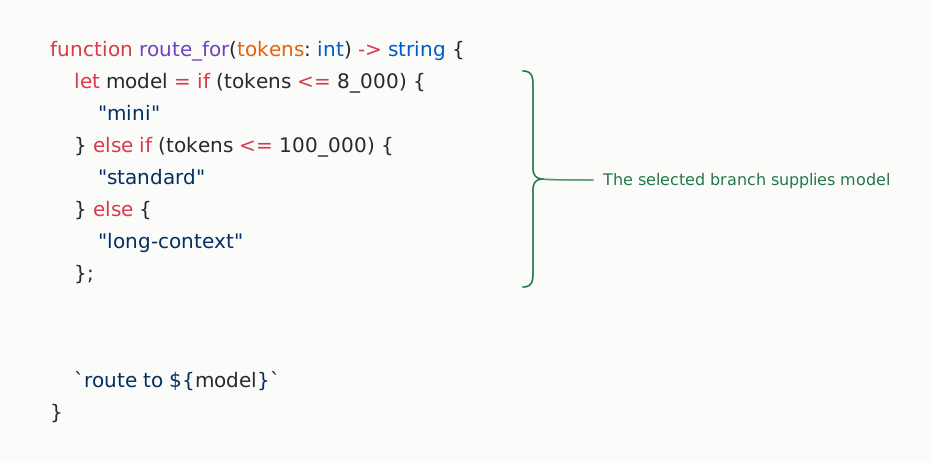
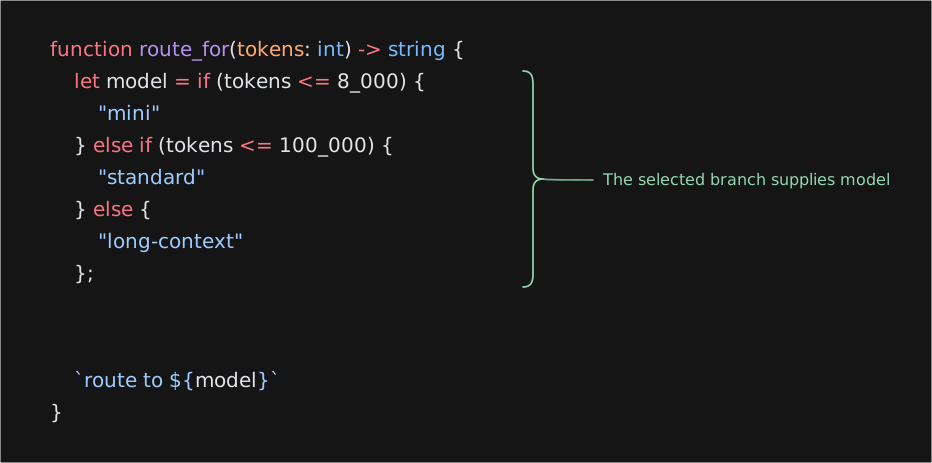
The conditions are checked in order. The first matching branch supplies the value of model; the final else handles inputs that didn't match either condition. The strings are labels for this example, not provider configurations.
The result is "route to standard".
When you use an if for its value, include an else so every path supplies one. An if used only to perform an action, such as the early return in clamp_tokens, doesn't need an else.
BAML uses this same if syntax wherever you need a conditional value. There is no separate condition ? yes : no operator.
Repeat work with loops
Visit each item with for
An array stores several values in order. This example uses string[], an array of strings, to represent the messages in a conversation:
main.bamlfunction estimate_tokens(text: string, chars_per_token: int = 4) -> int {
text.trim().length() / chars_per_token
}
function total_tokens(messages: string[]) -> int {
let total = 0;
for (let message in messages) {
if (message.trim() == "") {
continue;
}
total = total + estimate_tokens(message);
}
total
}
function main() -> int {
total_tokens(["Order status?", "", "It shipped Tuesday."])
}function estimate_tokens(text: string, chars_per_token: int = 4) -> int {
text.trim().length() / chars_per_token
}
function total_tokens(messages: string[]) -> int {
let total = 0;
for (let message in messages) {
if (message.trim() == "") {
continue;
}
total = total + estimate_tokens(message);
}
total
}
function main() -> int {
total_tokens(["Order status?", "", "It shipped Tuesday."])
}for (let message in messages) runs the body once for each message. continue skips the rest of the current iteration, so blank messages don't contribute to total.
The two nonempty messages contribute 3 and 4 under this estimator. Running main returns 7. An empty array returns 0 because the loop body never runs.
Repeat while a condition holds
Use while when you want to repeat an operation until a condition becomes false. For example, count how many fixed-size chunks a token estimate needs:
main.bamlfunction count_chunks(tokens: int, window: int) -> int {
let remaining = tokens;
let chunks = 0;
while (remaining > 0) {
remaining = remaining - window;
chunks = chunks + 1;
}
chunks
}function count_chunks(tokens: int, window: int) -> int {
let remaining = tokens;
let chunks = 0;
while (remaining > 0) {
remaining = remaining - window;
chunks = chunks + 1;
}
chunks
}It returns 4: three full chunks and one partial chunk. This counts chunks; it doesn't split the text. Pass a positive window so each iteration reduces remaining.
break exits a loop immediately. continue skips to the next iteration. Loops perform work without producing a value of their own; these examples store the result in a variable and return it after the loop.
Try it
Use count_chunks to check the boundaries:
count_chunks(0, 8_000)should return0.count_chunks(8_000, 8_000)should return1.count_chunks(8_001, 8_000)should return2.
Then change the function to return early when tokens is 0. The three results should stay the same. This gives you a small check that your change preserved the behavior.