Mix text and images in a prompt, extract typed data, and choose your model provider.
A vision-language model (VLM) accepts images alongside text. In BAML, declare an image argument and place it in the prompt where you want the model to see it.
This example uses a receipt. The same pattern works for screenshots, diagrams, and photographs.
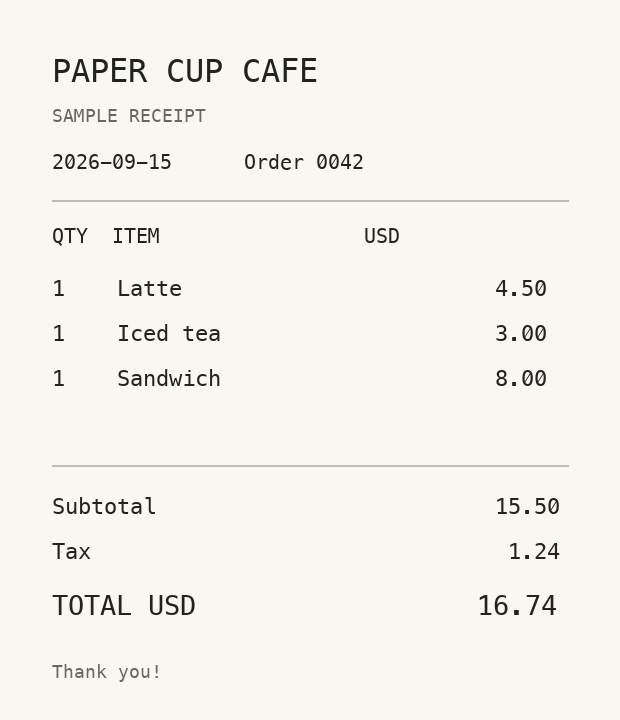
Ask a question
Which items on this receipt are drinks?
Expected answer
The latte and the iced tea.
Illustrative answer. Model responses can vary.
Ask a question about an image
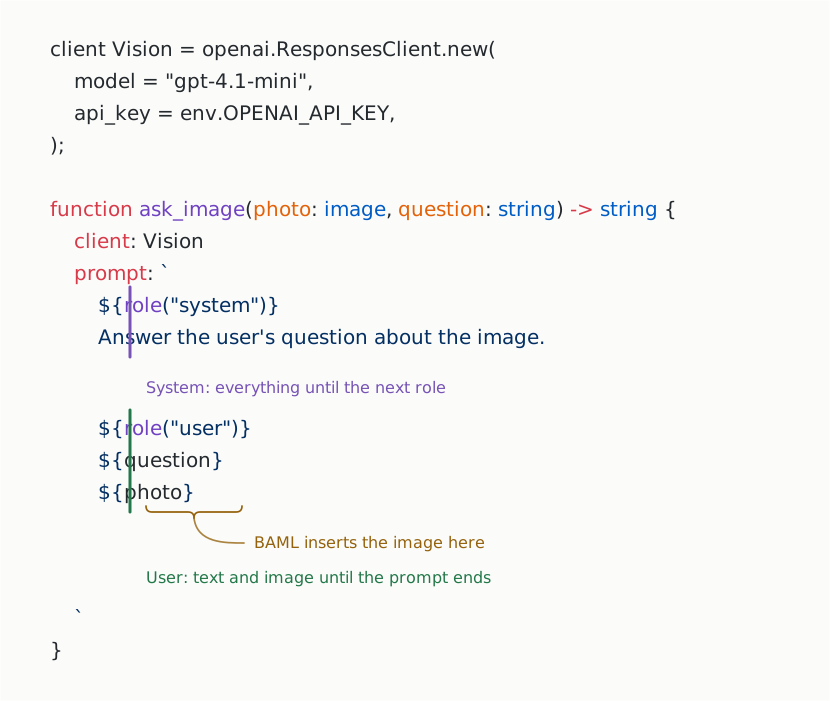
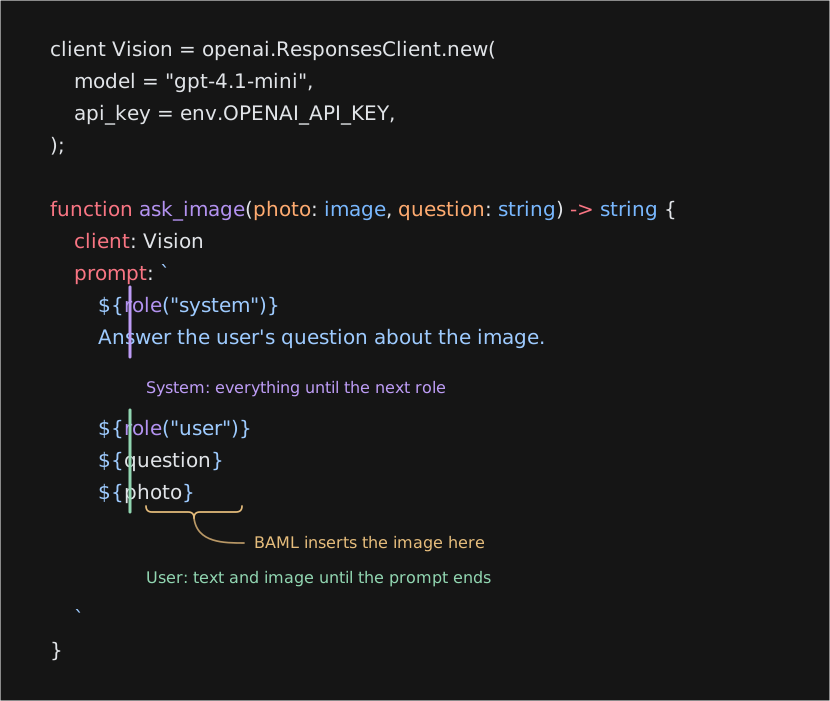
Visionconfigures an OpenAI Responses client. The examples below reuse it withclient: Vision.role("system")starts a system message. Everything after a role marker belongs to that role until the next marker or the end of the prompt.questionsupplies the user’s question.${photo}inserts the image value. BAML serializes it as image content in the provider’s request.stringgives you a text response. You can also return a class, as shown in Extract structured data.
Run the example
Use BAML canary for these examples. Install the BAML CLI, then select the channel, update it, and create a project:
Download main.baml into baml_src/, replacing the generated file. Save receipt.png in the vision-example directory, then set your API key:
You can pass arguments from the CLI or keep the call in a BAML function.
Pass arguments from the CLI
Call ask_image directly to change the image or question without editing BAML:
- Put function arguments after
--. - Pass the string argument with
--questionand the image value with--json-args. - Run
baml run ask_image -- --helpto see the arguments generated from the function signature.
Keep the call in BAML
Use ask_receipt when you want to save the image-loading step and question in your code:
 main.baml
function ask_receipt() -> string {
let photo = image.from_file("receipt.png", "image/png");
ask_image(photo, "Which items on this receipt are drinks?")
}function ask_receipt() -> string {
let photo = image.from_file("receipt.png", "image/png");
ask_image(photo, "Which items on this receipt are drinks?")
}Both options call the same ask_image function. The download includes ask_receipt and every other function on this page.
Only have credentials for another provider? Jump to Choose a model and provider.
Mix text and images
Put task instructions in the system message. Keep user-supplied context, questions, and images in the user message. Text can appear before or after an image.
main.bamlfunction ask_with_context(photo: image, context: string, question: string) -> string {
client: Vision
prompt: `
${role("system")}
Answer the user's question using the image and supplied context.
${role("user")}
Context: ${context}
Image: ${photo}
Question: ${question}
`
}
function ask_receipt_with_context() -> string {
ask_with_context(
image.from_file("receipt.png", "image/png"),
"I need to split the drinks from the food on this receipt.",
"What is the total for drinks, before tax?",
)
}function ask_with_context(photo: image, context: string, question: string) -> string {
client: Vision
prompt: `
${role("system")}
Answer the user's question using the image and supplied context.
${role("user")}
Context: ${context}
Image: ${photo}
Question: ${question}
`
}
function ask_receipt_with_context() -> string {
ask_with_context(
image.from_file("receipt.png", "image/png"),
"I need to split the drinks from the food on this receipt.",
"What is the total for drinks, before tax?",
)
}- Use
contextfor information you supply, such as the task you're working on. - Use
questionfor what you want the model to answer. - Interpolate the
imagevalue itself. Putting a file path or URL in a plain string does not attach the image.
Run baml run ask_receipt_with_context. For the sample receipt, the drinks total is $7.50 before tax.
Pass multiple images
Label the images to make references such as “before” and “after” explicit.
main.bamlfunction compare_images(before: image, after: image) -> string {
client: Vision
prompt: `
${role("system")}
Compare the receipts. Identify items that were added or removed.
${role("user")}
Before: ${before}
After: ${after}
`
}
function compare_receipts() -> string {
compare_images(
image.from_file("receipt.png", "image/png"),
image.from_file("receipt-updated.png", "image/png"),
)
}function compare_images(before: image, after: image) -> string {
client: Vision
prompt: `
${role("system")}
Compare the receipts. Identify items that were added or removed.
${role("user")}
Before: ${before}
After: ${after}
`
}
function compare_receipts() -> string {
compare_images(
image.from_file("receipt.png", "image/png"),
image.from_file("receipt-updated.png", "image/png"),
)
}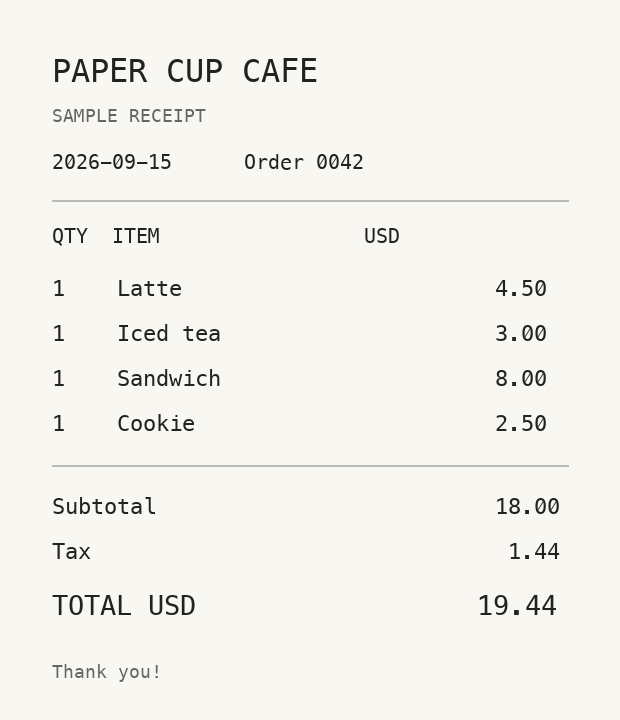
Save receipt-updated.png beside the original, then run:
Accept a list of images
If the image count varies, put each image and its label in a class and pass an array. BAML preserves image values inside the array when it builds the prompt.
main.bamlclass LabeledImage {
label: string,
photo: image,
}
function ask_images(photos: LabeledImage[], question: string) -> string {
client: Vision
prompt: `
${role("system")}
Answer the user's question using the labeled images.
${role("user")}
${question}
${photos}
`
}class LabeledImage {
label: string,
photo: image,
}
function ask_images(photos: LabeledImage[], question: string) -> string {
client: Vision
prompt: `
${role("system")}
Answer the user's question using the labeled images.
${role("user")}
${question}
${photos}
`
}Call it with labeled receipts
main.bamlfunction compare_labeled_receipts() -> string {
ask_images(
[
LabeledImage {
label: "Original receipt",
photo: image.from_file("receipt.png", "image/png"),
},
LabeledImage {
label: "Updated receipt",
photo: image.from_file("receipt-updated.png", "image/png"),
},
],
"Which items changed between these receipts?",
)
}function compare_labeled_receipts() -> string {
ask_images(
[
LabeledImage {
label: "Original receipt",
photo: image.from_file("receipt.png", "image/png"),
},
LabeledImage {
label: "Updated receipt",
photo: image.from_file("receipt-updated.png", "image/png"),
},
],
"Which items changed between these receipts?",
)
}Run baml run compare_labeled_receipts after downloading both images.
Control the layout with a loop
Use a loop in the prompt to put each label immediately before its image:
main.bamlfunction ask_images_loop(photos: LabeledImage[], question: string) -> string {
client: Vision
prompt: `
${role("system")}
Answer the user's question using the labeled images.
${role("user")}
${question}
${for (let item in photos)}
${item.label}:
${item.photo}
${endfor}
`
}function ask_images_loop(photos: LabeledImage[], question: string) -> string {
client: Vision
prompt: `
${role("system")}
Answer the user's question using the labeled images.
${role("user")}
${question}
${for (let item in photos)}
${item.label}:
${item.photo}
${endfor}
`
}${for (let item in photos)}repeats the prompt content through${endfor}for each item.${item.label}inserts the label as text;${item.photo}inserts image content.- Use this form to control the text and spacing around each image. Interpolating
${photos}directly uses BAML's default formatting for the array and its objects.
To try it with the same receipts, change ask_images to ask_images_loop in compare_labeled_receipts, then run baml run compare_labeled_receipts.
This sends the images together in one model request. To process each image independently, call the function separately for each image.
Extract structured data
Return a class when you need fields your application can use.
main.bamlclass ReceiptItem {
name: string,
quantity: int?,
price: float? @description("Line total, before tax."),
}
class Receipt {
merchant: string?,
items: ReceiptItem[],
total: float?,
currency: string? @description("Currency code, if shown on the receipt."),
}class ReceiptItem {
name: string,
quantity: int?,
price: float? @description("Line total, before tax."),
}
class Receipt {
merchant: string?,
items: ReceiptItem[],
total: float?,
currency: string? @description("Currency code, if shown on the receipt."),
}Use that class as the function's return type. Put ctx.output_format() in the system message with the extraction instructions. The user message contains the receipt image.
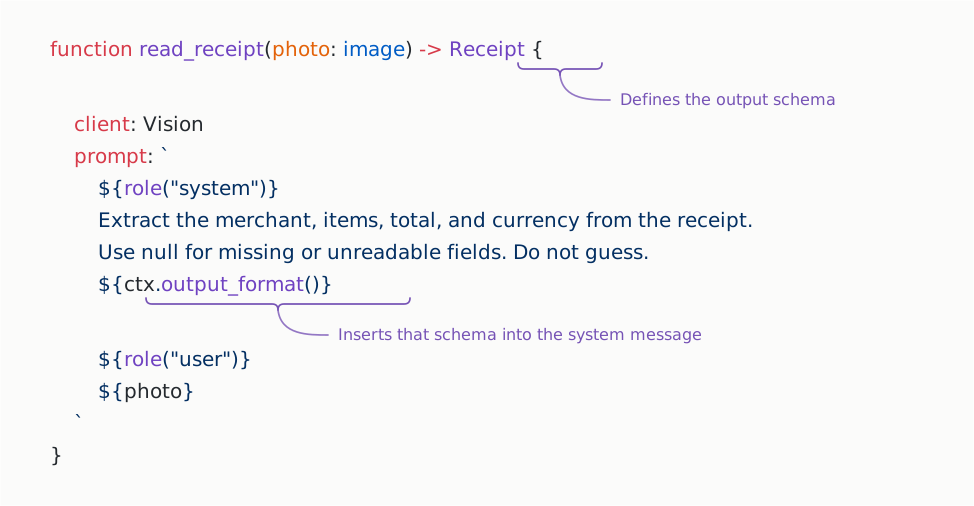
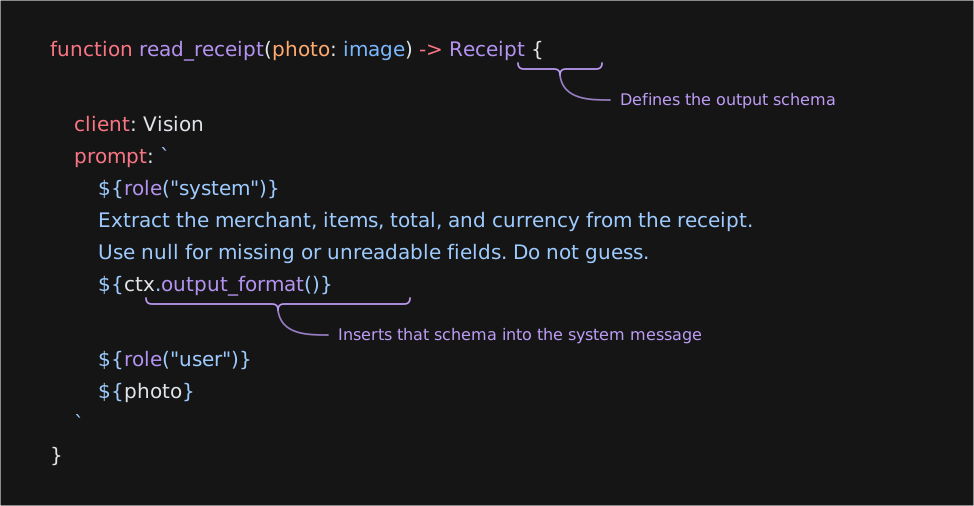
ctxis the prompt context BAML supplies to the function.ctx.output_format()generates output instructions fromReceipt, including its fields, types, and descriptions. Interpolating it here adds those instructions to the system message.- Update
Receiptwhen the output shape changes. BAML generates the corresponding instructions; you don't need to repeat the schema in your prompt.
For the sample receipt, an expected result is:
Use the fields directly:
main.bamlfunction receipt_summary() -> string {
let receipt = read_receipt(image.from_file("receipt.png", "image/png"));
let names = receipt.items
.map((item) -> {
item.name
})
.join(", ");
let total = receipt.total?.to_string() ?? "unreadable";
`Items: ${names}. Total: ${total}.`
}function receipt_summary() -> string {
let receipt = read_receipt(image.from_file("receipt.png", "image/png"));
let names = receipt.items
.map((item) -> {
item.name
})
.join(", ");
let total = receipt.total?.to_string() ?? "unreadable";
`Items: ${names}. Total: ${total}.`
}Run baml run receipt_summary.
float?andstring?allow missing values to benull.- The prompt asks the model not to guess unreadable fields.
- A result with the right types can still contain misread values. Check extracted fields against the image when accuracy matters.
Load your own images
Use the constructor that matches where your image comes from. These calls reuse read_receipt.
Image URL
main.bamlfunction read_url(url: string) -> Receipt {
read_receipt(image.from_url(url, "image/png"))
}function read_url(url: string) -> Receipt {
read_receipt(image.from_url(url, "image/png"))
}Use a direct image URL that can be fetched without your browser session. Depending on the client, BAML or the provider downloads the image. A link to a page containing an image is not the image URL.
Local file
main.bamlfunction read_file(path: string) -> Receipt {
read_receipt(image.from_file(path, "image/png"))
}function read_file(path: string) -> Receipt {
read_receipt(image.from_file(path, "image/png"))
}The file must exist on the machine running BAML. In these CLI examples, receipt.png is relative to the directory you run the command from. Use an absolute path if needed.
Upload or base64 content
main.bamlfunction read_upload(base64_data: string, mime_type: string) -> Receipt {
read_receipt(image.from_base64(base64_data, mime_type))
}function read_upload(base64_data: string, mime_type: string) -> Receipt {
read_receipt(image.from_base64(base64_data, mime_type))
}Pass the base64-encoded file contents without a data:image/...;base64, prefix. Set the MIME type to match the file, such as image/png or image/jpeg.
Choose a model and provider
BAML includes clients for OpenAI, Anthropic, and Google, among others. Each client converts the prompt's text and images into its provider's request format. Your selected model must support image input.
Pass client = model directly to read_receipt to override its default for one call. The function returns a Receipt as usual; its prompt and return type stay the same.
Choose a provider you have access to:
Set OPENAI_API_KEY.
main.bamlfunction read_with_openai() -> Receipt {
let model = openai.ResponsesClient.new(model = "gpt-4.1-mini");
read_receipt(image.from_file("receipt.png", "image/png"), client = model)
}function read_with_openai() -> Receipt {
let model = openai.ResponsesClient.new(model = "gpt-4.1-mini");
read_receipt(image.from_file("receipt.png", "image/png"), client = model)
}Set ANTHROPIC_API_KEY.
main.bamlfunction read_with_anthropic() -> Receipt {
let model = anthropic.Client.new(model = "claude-haiku-4-5");
read_receipt(image.from_file("receipt.png", "image/png"), client = model)
}function read_with_anthropic() -> Receipt {
let model = anthropic.Client.new(model = "claude-haiku-4-5");
read_receipt(image.from_file("receipt.png", "image/png"), client = model)
}Set GOOGLE_API_KEY.
main.bamlfunction read_with_google() -> Receipt {
let model = google.GeminiClient.new(model = "gemini-2.5-flash");
read_receipt(image.from_file("receipt.png", "image/png"), client = model)
}function read_with_google() -> Receipt {
let model = google.GeminiClient.new(model = "gemini-2.5-flash");
read_receipt(image.from_file("receipt.png", "image/png"), client = model)
}Only the selected client's credentials are needed. Using Anthropic or Google here does not require an OpenAI key, even though read_receipt declares OpenAI as its default.
Provider support does not make every model interchangeable. Check your chosen model's image formats, size limits, and image-count limits: OpenAI vision, Claude vision, and Gemini image understanding.
Compare models on the same image
Use the same image, prompt, and return type for each model. Keep the model identifier beside its result so you can compare extracted fields.
main.bamlclass ModelReceipt {
model: string,
receipt: Receipt,
}
function compare_models() -> ModelReceipt[] {
let photo = image.from_file("receipt.png", "image/png");
let models: ai.Client[] = [
openai.ResponsesClient.new(model = "gpt-4.1-mini"),
anthropic.Client.new(model = "claude-haiku-4-5"),
google.GeminiClient.new(model = "gemini-2.5-flash"),
];
models.map((model) -> {
ModelReceipt { model: model.id(), receipt: read_receipt(photo, client = model) }
})
}class ModelReceipt {
model: string,
receipt: Receipt,
}
function compare_models() -> ModelReceipt[] {
let photo = image.from_file("receipt.png", "image/png");
let models: ai.Client[] = [
openai.ResponsesClient.new(model = "gpt-4.1-mini"),
anthropic.Client.new(model = "claude-haiku-4-5"),
google.GeminiClient.new(model = "gemini-2.5-flash"),
];
models.map((model) -> {
ModelReceipt { model: model.id(), receipt: read_receipt(photo, client = model) }
})
}Run baml run compare_models --output-format json. This makes three sequential requests and requires credentials for all three providers. An error stops the comparison. For concurrent requests or collecting failures alongside successes, see Run work concurrently.
Compare each result with the receipt: were all three items found, was tax excluded from item prices, and was the total read as $16.74?
Connect another provider
OpenAI-compatible endpoint
If your provider supports the OpenAI Chat Completions API with image inputs, use openai.GenericClient:
main.bamlclient CustomVision = openai.GenericClient.new(
model = "your-vision-model-id",
base_url = env.VISION_BASE_URL,
api_key = env.VISION_API_KEY,
);
function read_with_custom_provider() -> Receipt {
read_receipt(image.from_file("receipt.png", "image/png"), client = CustomVision)
}client CustomVision = openai.GenericClient.new(
model = "your-vision-model-id",
base_url = env.VISION_BASE_URL,
api_key = env.VISION_API_KEY,
);
function read_with_custom_provider() -> Receipt {
read_receipt(image.from_file("receipt.png", "image/png"), client = CustomVision)
}- Replace
your-vision-model-idwith a vision model available on your endpoint. - Set
VISION_BASE_URLto the API root, such ashttps://your-host.example/v1. The client appends/chat/completions. - Set
VISION_API_KEYto that provider's key. Omitapi_keyif the endpoint requires no authentication. - For additional headers or request fields, inspect
baml describe openai.GenericClient.
Run baml run read_with_custom_provider --output-format json.
An endpoint that supports text-only Chat Completions is not enough: it must also accept image content parts.
Local vision model
Start an OpenAI-compatible server with a vision model loaded, then point BAML at its API root:
main.bamlfunction read_with_local_model(model_id: string) -> Receipt {
let model = openai.GenericClient.new(model = model_id, base_url = "http://localhost:8000/v1");
read_receipt(image.from_file("receipt.png", "image/png"), client = model)
}function read_with_local_model(model_id: string) -> Receipt {
let model = openai.GenericClient.new(model = model_id, base_url = "http://localhost:8000/v1");
read_receipt(image.from_file("receipt.png", "image/png"), client = model)
}Change the port if needed. Pass the model identifier reported by your server:
The server must support base64 image inputs because this example reads a local file. Server startup and model installation depend on the serving software you choose.
Implement a custom client: Cloudflare Workers AI
This example connects to Cloudflare's native endpoint for Llama 3.2 Vision. It sends the image in a separate image field and reads the answer from result.response.
Cloudflare also offers an OpenAI-compatible endpoint. Use openai.GenericClient for that endpoint. Implement ai.Client when you need a provider's native request or response format.
Pass the custom client to the same read_receipt function:
main.bamlfunction read_with_cloudflare(account_id: string) -> Receipt {
let model = CloudflareVisionClient { account_id, api_token: env.CLOUDFLARE_API_TOKEN };
let photo = image.from_file("receipt.png", "image/png");
read_receipt(photo, client = model)
}function read_with_cloudflare(account_id: string) -> Receipt {
let model = CloudflareVisionClient { account_id, api_token: env.CLOUDFLARE_API_TOKEN };
let photo = image.from_file("receipt.png", "image/png");
read_receipt(photo, client = model)
}Create a Workers AI API token, then complete Cloudflare's model license setup. Run:
The downloadable source includes the complete implementation below.
Complete Cloudflare client implementation
These classes describe Cloudflare's request and response JSON:
main.bamlclass CloudflareMessage {
role: string,
content: string,
}
class CloudflareVisionInput {
messages: CloudflareMessage[],
image: string,
stream: bool,
max_tokens: int,
}
class CloudflareResult {
response: string,
}
class CloudflareResponse {
success: bool,
result: CloudflareResult?,
errors: json[],
}class CloudflareMessage {
role: string,
content: string,
}
class CloudflareVisionInput {
messages: CloudflareMessage[],
image: string,
stream: bool,
max_tokens: int,
}
class CloudflareResult {
response: string,
}
class CloudflareResponse {
success: bool,
result: CloudflareResult?,
errors: json[],
}The client translates the prompt, sends the request, and returns the model's text:
main.bamlclass CloudflareVisionClient {
account_id: string,
api_token: ai.Credential,
implements ai.Client {
function id(self) -> string {
"cloudflare/llama-3.2-11b-vision-instruct"
}
function render(self, input: ai.ModelTurnInput) -> baml.http.Request {
self.build_request(input, preview = true) catch_all (error) {
_ => throw ai.errors.normalize(error),
}
}
function invoke(self, input: ai.ModelTurnInput) -> ai.ModelTurn {
{
let request = self.build_request(input, preview = false);
let response = ai.wire.send_as<CloudflareResponse>(request, self.id(), request_timeout_ms = 60000);
self.to_turn(response)
} catch_all (error) {
_ => throw ai.errors.normalize(error),
}
}
}
function invalid_request(self, detail: string) -> ai.errors.InvalidRequest {
ai.errors.InvalidRequest { provider: self.id(), status_code: null, detail, raw_body: null }
}
function build_request(self, input: ai.ModelTurnInput, preview: bool) -> baml.http.Request {
let has_history = input.journal.entries().some((event) -> {
match (event) {
let started: ai.events.RunStarted => false,
_ => true,
}
});
if (!input.toolbox.is_empty() || has_history) {
throw self.invalid_request("This example supports single-turn prompts without tools.");
}
let prompt = input.prompt(ai.internal.build_output_format(input.output_type));
let messages: CloudflareMessage[] = [];
let image_data: string? = null;
for (let message in prompt.messages()) {
if (message.role != "system" && message.role != "user") {
throw self.invalid_request("This example supports system and user messages.");
}
let text: string[] = [];
for (let part in message.parts) {
match (part) {
let value: string => {
text.push(value);
},
let photo: image => {
if (message.role != "user" || image_data != null) {
throw self.invalid_request("Provide exactly one image, in a user message.");
}
let media = if (preview) {
ai.wire.resolve_media_preview(photo)
} else {
ai.wire.resolve_media(photo, fetch_url = true)
};
let data = media.base64
?? throw ai.errors.PreviewUnsupported {
provider: self.id(),
detail: "Use a base64 image to preview this request.",
};
image_data = `data:${media.mime_type};base64,${data}`;
},
_ => {
throw self.invalid_request("This example accepts images, not audio, video, or PDFs.")
},
};
}
messages.push(CloudflareMessage { role: message.role, content: text.join("") });
}
let photo = image_data ?? throw self.invalid_request("Provide one image.");
let token = if (preview) {
"[redacted]"
} else {
ai.wire.resolve_credential(self.api_token, null)
?? throw self.invalid_request("Set CLOUDFLARE_API_TOKEN.")
};
baml.http.Request {
method: "POST",
url: `https://api.cloudflare.com/client/v4/accounts/${self.account_id}/ai/run/@cf/meta/llama-3.2-11b-vision-instruct`,
headers: { "Authorization": `Bearer ${token}`, "Content-Type": "application/json" },
body: baml.json.to_string(
CloudflareVisionInput { messages, image: photo, stream: false, max_tokens: 2048 },
),
}
}
function to_turn(self, response: CloudflareResponse) -> ai.ModelTurn {
if (!response.success) {
throw self.invalid_request(baml.json.to_string(response.errors));
}
let result = response.result
?? throw ai.errors.ParseFailed {
provider: self.id(), raw_output: baml.json.to_string(response),
};
ai.ModelTurn {
content: [ai.content.Text { text: result.response }],
stop_reason: ai.content.StopReason.Complete,
usage: null,
calls: [],
}
}
}class CloudflareVisionClient {
account_id: string,
api_token: ai.Credential,
implements ai.Client {
function id(self) -> string {
"cloudflare/llama-3.2-11b-vision-instruct"
}
function render(self, input: ai.ModelTurnInput) -> baml.http.Request {
self.build_request(input, preview = true) catch_all (error) {
_ => throw ai.errors.normalize(error),
}
}
function invoke(self, input: ai.ModelTurnInput) -> ai.ModelTurn {
{
let request = self.build_request(input, preview = false);
let response = ai.wire.send_as<CloudflareResponse>(request, self.id(), request_timeout_ms = 60000);
self.to_turn(response)
} catch_all (error) {
_ => throw ai.errors.normalize(error),
}
}
}
function invalid_request(self, detail: string) -> ai.errors.InvalidRequest {
ai.errors.InvalidRequest { provider: self.id(), status_code: null, detail, raw_body: null }
}
function build_request(self, input: ai.ModelTurnInput, preview: bool) -> baml.http.Request {
let has_history = input.journal.entries().some((event) -> {
match (event) {
let started: ai.events.RunStarted => false,
_ => true,
}
});
if (!input.toolbox.is_empty() || has_history) {
throw self.invalid_request("This example supports single-turn prompts without tools.");
}
let prompt = input.prompt(ai.internal.build_output_format(input.output_type));
let messages: CloudflareMessage[] = [];
let image_data: string? = null;
for (let message in prompt.messages()) {
if (message.role != "system" && message.role != "user") {
throw self.invalid_request("This example supports system and user messages.");
}
let text: string[] = [];
for (let part in message.parts) {
match (part) {
let value: string => {
text.push(value);
},
let photo: image => {
if (message.role != "user" || image_data != null) {
throw self.invalid_request("Provide exactly one image, in a user message.");
}
let media = if (preview) {
ai.wire.resolve_media_preview(photo)
} else {
ai.wire.resolve_media(photo, fetch_url = true)
};
let data = media.base64
?? throw ai.errors.PreviewUnsupported {
provider: self.id(),
detail: "Use a base64 image to preview this request.",
};
image_data = `data:${media.mime_type};base64,${data}`;
},
_ => {
throw self.invalid_request("This example accepts images, not audio, video, or PDFs.")
},
};
}
messages.push(CloudflareMessage { role: message.role, content: text.join("") });
}
let photo = image_data ?? throw self.invalid_request("Provide one image.");
let token = if (preview) {
"[redacted]"
} else {
ai.wire.resolve_credential(self.api_token, null)
?? throw self.invalid_request("Set CLOUDFLARE_API_TOKEN.")
};
baml.http.Request {
method: "POST",
url: `https://api.cloudflare.com/client/v4/accounts/${self.account_id}/ai/run/@cf/meta/llama-3.2-11b-vision-instruct`,
headers: { "Authorization": `Bearer ${token}`, "Content-Type": "application/json" },
body: baml.json.to_string(
CloudflareVisionInput { messages, image: photo, stream: false, max_tokens: 2048 },
),
}
}
function to_turn(self, response: CloudflareResponse) -> ai.ModelTurn {
if (!response.success) {
throw self.invalid_request(baml.json.to_string(response.errors));
}
let result = response.result
?? throw ai.errors.ParseFailed {
provider: self.id(), raw_output: baml.json.to_string(response),
};
ai.ModelTurn {
content: [ai.content.Text { text: result.response }],
stop_reason: ai.content.StopReason.Complete,
usage: null,
calls: [],
}
}
}- Keep your prompt and return type.
input.prompt(...)renders the system instructions, output schema, user text, and image. BAML parses the returned text intoReceipt. - Translate the image.
build_requestpreserves message roles and puts the image in Cloudflare's separate field. During a call,resolve_mediareads files or downloads URLs and produces base64 data. - Preview without I/O.
renderrequires a base64 image and redacts the token. It does not read image files or fetch URLs. - Handle HTTP failures.
send_aschecks the status, decodes the JSON envelope, and applies a 60-second request timeout.to_turnchecks the envelope'ssuccessfield before returning text.
This example supports one image per call, system and user messages, and non-streaming text responses. It rejects tools, conversation history, and extra images. It does not record usage or call traces. The request and response handling is tested with fixtures; a live Cloudflare model call requires your account and token.
Troubleshoot image inputs
- The image URL cannot be fetched. Check that it returns image bytes and does not require cookies or an expired signed URL. For a private upload, send base64 content instead.
- The model rejects images. Check the model's input capabilities and the endpoint's support for image content parts.
- The request is too large. Reduce the number of images or resize them within the provider's limits. Keep text large enough to read.
- Small or rotated text is misread. Rotate the image upright, use a sharper original, or send a crop around the relevant content.
- Fields are missing or wrong. Allow
nullwhere information may be absent. Inspect the source image and refine field descriptions rather than assuming every image contains every field. - A local image fails in request preview.
@build_requestdoes not read local image files. Use a URL or base64 value to inspect the request, then use a normal function call to process the local file.
Share your provider
Built a custom client and want it added to BAML's standard library? Contact us on Discord with your implementation and a link to the provider's API documentation.